
Overmolded Cable Design Input Worksheet
Table of Contents
A photograph can communicate the general shape of an overmolded cable, but it rarely defines where a length starts, which face must remain clear or how the cable should leave the molded body. This worksheet gives those details a place in the input package before a factory interprets the sketch.
It accompanies the custom overmolded cable assembly sourcing page. That page explains the service and quotation scope. This resource provides an editable requirement register, a dimension-annotation page and a complete fictional example for preparing your own review. It is an input worksheet, not a released manufacturing drawing.
Download the input workbook
Download the editable English design-input workbook. It contains Blank requirements and Blank drawing sheets, followed by Example requirements and Example drawing. The blank drawing includes a generic side view, front view and labeled dimension references. Enter dimensions, tolerances and questions in the matching editable rows or attach your own marked drawing.
All EX references, dimensions and project conditions in the example are fictional. They demonstrate the recording method and are not Zeakka manufacturing limits, recommended dimensions or promised performance. The diagram is schematic and does not resize when a value changes. Replace it with the actual geometry for a design that needs a different interface, curved exit or multiple branches.
Establish the reference before entering dimensions
Identify the assembly, connector and mating counterpart, cable construction and drawing revision at the top of the requirements sheet. Assign a revision to this input package so a quotation can refer to a specific set of assumptions. Record which items are fixed and which are proposals. A requested material grade, a factory's suggested grade and an approved grade are different states.
The drawing starts at datum A, defined in the example as the connector mating reference plane. L measures from A to the rear limit of the molded body. H and W describe the maximum body envelope in the indicated side and front views. X identifies the end of the reserved mating zone measured from A. D describes the cable outside diameter, with its tolerance recorded separately. The exit field states direction relative to the connector axis and identifies the viewing convention.
For an actual project, choose datums that match the equipment drawing and inspection method. Include the units and state whether a dimension is a maximum limit, a nominal value with tolerance or information only. Do not mix those meanings in a single unlabeled number.
Mark the envelope, exit and reserved spaces
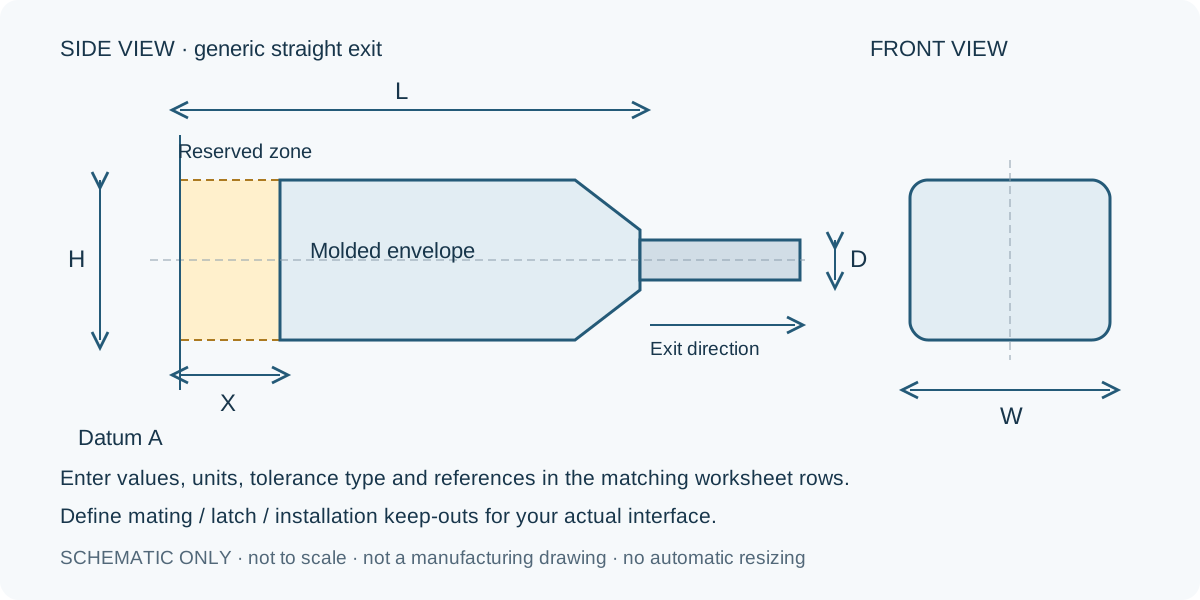
Open the blank annotation diagram for markup alongside the workbook. The shaded connector-side zone is a reminder to define the mating area that must remain accessible. It is not a universal clearance value. Add latch access, screw access, enclosure walls and any installation sweep that could constrain the real shape.
Scroll sideways to read all columns.
| Annotation | What to record | Why it belongs in the package |
|---|---|---|
| Datum A | Named face or plane and the referenced equipment drawing | Makes length measurements repeatable |
| L, H and W | Units, bounds, tolerance type and actual views | Defines the allowed body envelope |
| X and keep-out notes | Mating, latch, fastener and installation clearances | Separates usable space from an external outline |
| D | Cable outside diameter and tolerance from the identified cable | Gives the proposed process a defined cable input |
| Exit | Direction, angle if applicable and viewing convention | Prevents an ambiguous straight or right-angle instruction |
| Installation notes | Cable routing, support and access constraints | Shows conditions that a loose sample cannot represent |
The example uses an L limit of 32 mm, H of 16 mm, W of 18 mm, a 6 mm reserved mating zone and a cable D of 4.8 mm with a ±0.2 mm tolerance. Those values describe only the invented EX-OM-55 package. They do not establish a tolerance stack, wall thickness or feasible tool design. The responsible engineer and proposed factory still need to review the complete geometry.
Connect geometry to material and validation requirements
The requirement register keeps each input beside its evidence, open question, owner and review action. It covers the exact cable and connector, material selection, exposure, mechanical use, inspection and tooling assumptions. Enter an exact material grade if it is specified. Otherwise describe the required behavior and mark grade selection as open. A broad family name does not establish adhesion to a particular jacket or suitability for a temperature or chemical exposure.
Separate a required outcome from the evidence needed to establish it. For example, record the installation pull or flex condition to be reviewed, then agree the sample configuration, method and acceptance criterion. An overmolded shape alone does not establish a sealing rating. If sealing is required, define the boundaries and the actual assembled condition to be assessed.
Connector support also needs application context. TE Connectivity's backshell selection guidance describes cable support and strain relief as functions of a connector accessory. It is useful context for asking where loads are carried, not evidence that a generic molded shape will meet a particular load. The worksheet intentionally supplies no universal force, bend radius or sealing criterion.
Read the fictional example as an unfinished design review
EX-OM-55 is a proposed straight-exit input package for a fictional dry indoor device. Its geometry entries are filled, but the material grade, attachment to the specified jacket and mechanical validation remain open. The requirements sheet names an owner and next action for each question, including obtaining cable construction evidence and agreeing a sample review with the actual enclosure.
The example's manual decision stays ‘Input review only. No tooling or production release.’ This is intentional: a complete input form can still describe an incomplete design. Record the drawing and requirement revisions reviewed when an authorized decision is later made. Keep quotation assumptions, tooling authorization and production approval identifiable instead of treating an email accepting the sketch as permission for every subsequent step.
Amber fields are editable. Record checks identify missing fields and duplicate IDs only. They do not validate dimensions, convert an Unknown into a confirmed property or authorize tooling. There are ten requirement rows and seven dimension rows. Extend formulas and duplicate-ID bounds together if more rows are needed.
Frequently asked questions
Can I start without a 3D model?
Yes. Use the blank drawing to define the available envelope and references, then attach sketches or photos of the actual interfaces. Complex geometry may require a controlled drawing or model before tooling can be quoted or approved.
Do the example dimensions describe a product Zeakka supplies?
No. They are invented values for learning how to complete the form. The diagram is a generic annotation aid. Actual configurations, materials, tooling and tolerances require project review.
Does completing the worksheet authorize a mold or establish an IP rating?
No. The manual decision area records the separately authorized scope. Tooling and any sealing requirement need their own agreed geometry, configuration, method, acceptance criteria and approval.
Send the input package for sourcing review
Send Zeakka the workbook and your marked drawing, together with quantity, delivery needs and the documents referenced in the form. Zeakka is a trading and sourcing partner and coordinates suitable factory reviews. For the commercial process, see custom overmolded cable assemblies. State the unresolved items so quotations and sample plans can identify their assumptions explicitly.
Share this article
Help others discover this content