
Cable Kit BOM and Packing List Template
Table of Contents
A cable kit BOM identifies the collection of assemblies required for one equipment build or service task. Its packing list records how the ordered kits and extra assemblies are distributed across identifiable boxes. Keeping these two records together helps distinguish a complete kit from a shipment containing the right overall number of cables in the wrong groups.
Download the editable cable kit BOM and packing list. The workbook contains a blank sheet and a complete fictional three-assembly example. Amber cells are editable inputs; white quantity and variance cells calculate. The file supports three assembly types and fourteen packing rows, with instructions for extending both areas together.
Separate kit demand, spare quantities and shipment totals
Fictional three-assembly kit example. A, B and C abbreviate EX-CA-A, EX-CA-B and EX-CA-C; the arithmetic does not approve a shipment.
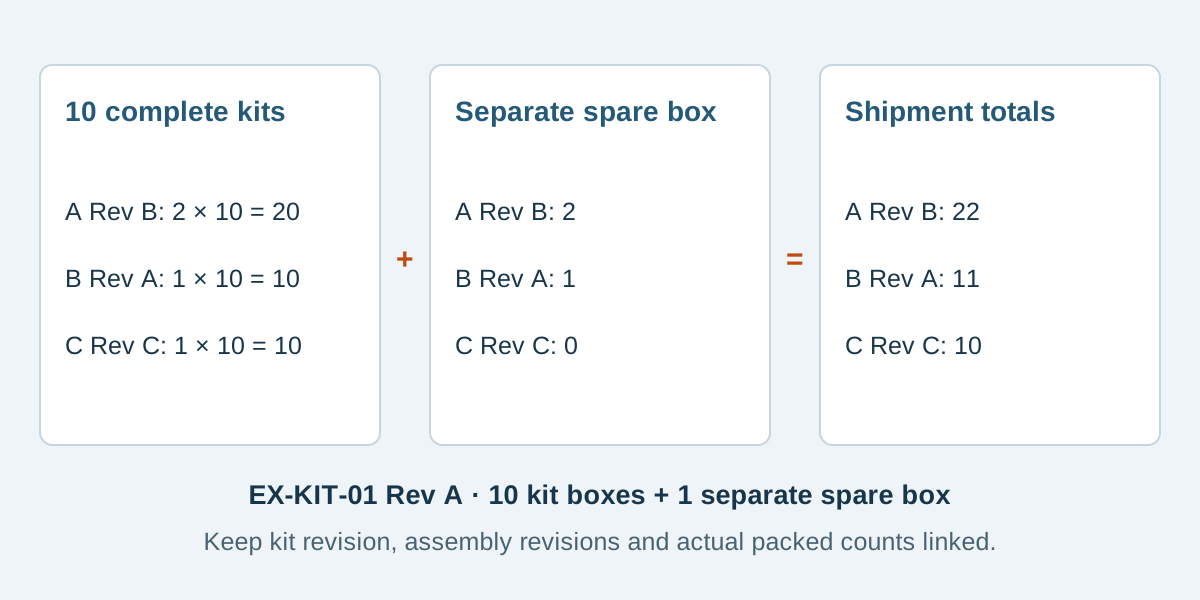
Conceptual illustration. Fictional examples are not approved product configurations, tooling instructions or inspection results.
Give the kit and each assembly their own revision
Enter the kit identifier, kit revision, order reference, number of kits and packing-list revision. Then identify every included cable assembly and its exact revision. A change to the kit's contents may require a new kit revision even when the individual harness designs stay unchanged.
Use one BOM row for each assembly/revision pair. Do not replace a specified revision with a general instruction to use whichever drawing is newest. Keep the selected drawing and approval records with the order. The cable assembly BOM template defines the components inside one harness; this worksheet counts the finished harnesses inside a kit.
If you are still deciding whether a kit should be the purchasing unit, use the kit versus individual assembly guide. This resource starts after a proposed kit structure exists and provides the quantity and packing record.
Calculate kit demand and extra spares separately
The calculation for each assembly is simple: quantity per kit multiplied by the number of kits, plus separately stated extra spares. Enter zero when no extra spares are required. Leaving the spare quantity blank leaves the required total blank, because the workbook cannot know whether the omission means zero or an undecided requirement.
Scroll sideways to read all columns.
| Fictional assembly | Revision | Per kit | For 10 kits | Extra spares | Shipment requirement |
|---|---|---|---|---|---|
| EX-CA-A sensor lead | B | 2 | 20 | 2 | 22 |
| EX-CA-B power harness | A | 1 | 10 | 1 | 11 |
| EX-CA-C panel lead | C | 1 | 10 | 0 | 10 |
The example kit is EX-KIT-01 Rev A. Every EX reference is a teaching label, not an orderable part, actual shipment or Zeakka customer project. The example counts describe the agreed contents; they do not add purchasing allowances, losses, MOQ rounding or unrequested replacement stock.
Do not put the two spare sensor leads into the per-kit quantity. That would change every kit. Extra spares belong in their own quantity field and need an explicit packing instruction.
Record the contents of each identifiable box
The example uses ten individually identified kit boxes, EX-BOX-001 through EX-BOX-010. Each contains one complete kit: two EX-CA-A Rev B, one EX-CA-B Rev A and one EX-CA-C Rev C. Each row records one kit and the actual piece counts.
EX-SPARES-01 is a separate box containing two EX-CA-A Rev B and one EX-CA-B Rev A. Its panel-lead count is explicitly zero, and its complete-kit count is zero. Its label says extra spares and does not describe the box as another kit. The shipment therefore has eleven identified boxes containing ten kits and three separately packed spare assemblies.
For a different packing arrangement, describe it explicitly. Several complete kits can share a box if their grouping, piece counts and identification are agreed. An authorized partial kit needs its own clear record and disposition; it must not silently become a complete kit in the count column.
The workbook's ordinary EX box IDs are internal references. GS1 explains that a logistic-unit identifier can link a physical unit to the messages describing it. If a customer requires GS1 logistic labels, agree that system separately; these examples do not generate valid SSCC identifiers or barcode labels. GS1 GO identification guidance
Reconcile numbers and inspect the physical groups
The packed-total column sums each assembly's recorded pieces across the packing rows. Every identified box must have numeric counts, including zeros. If an identified box is missing a count, the affected packed total remains blank. Leave unused rows completely blank.
Compare the recorded kit count with the requested kit quantity. Then review each variance, calculated as packed pieces minus required pieces. A negative result indicates a recorded shortage; a positive result indicates a recorded excess. Resolve missing data before interpreting either.
A zero variance is only a quantity reconciliation. One box could have three sensor leads while another has one, leaving the overall total unchanged but both kits incorrect. Check each physical group against its row, including assembly identity, revision, quantity and label. Electrical conformity, protective packing and shipment authorization remain separate checks.
Send the kit definition with the assembly files
Include the completed worksheet, referenced assembly drawings, agreed acceptance requirements and any packing-label instructions. State who supplies each item and who approves substitutions, partial delivery and final release. An unavailable assembly needs an explicit resolution rather than an unnoticed change to the kit.
Zeakka coordinates sourcing and supplier review for custom discrete-wire cable assemblies. Specific kitting, labeling, counting and record arrangements require project confirmation. Original branded components are considered within finished assemblies, and original loose parts are not sold separately. Send the proposed kit BOM and packing requirements to start a review.
Common questions
Can the same assembly appear twice in the kit?
Use one row for the same assembly and revision, with the combined quantity per kit. Different revisions need distinct identities and an explicit permitted configuration. Similar appearance does not make two references interchangeable.
Does the workbook automatically approve a complete shipment?
No. It calculates requirements and compares recorded quantities. Review physical contents, revision evidence, labels, electrical acceptance and release authorization separately. A blank or zero variance is not a shipment approval.
Can I add a fourth assembly type or more boxes?
Extend the BOM and packing matrix together, copying and adapting the relevant formulas and validation. Extend every affected total range and recheck the quantities. Keep each packing column tied to one assembly/revision pair.
Share this article
Help others discover this content