
Panel-Mount vs Free-Hanging Connectors: Specify the Installation
Table of Contents
A panel-mount connector holds a mating interface at a defined opening in an enclosure or bracket. A free-hanging connector joins cable ends without its housing being fixed directly into that opening. The practical choice is where the connection should stay during installation, operation and service.
Neither label defines the complete electrical connection. A cable-to-cable connection can have one housing secured to a panel. Start with the wire-to-board versus wire-to-wire guide if the electrical layout is still open. This guide addresses the mechanical installation once the intended disconnect location is known.
Panel retention and mating are separate steps
Conceptual sequence: prepare the housing, retain it in the panel, then mate the cable end. Free-hanging housings instead remain along a separately supported route. Not a product drawing.
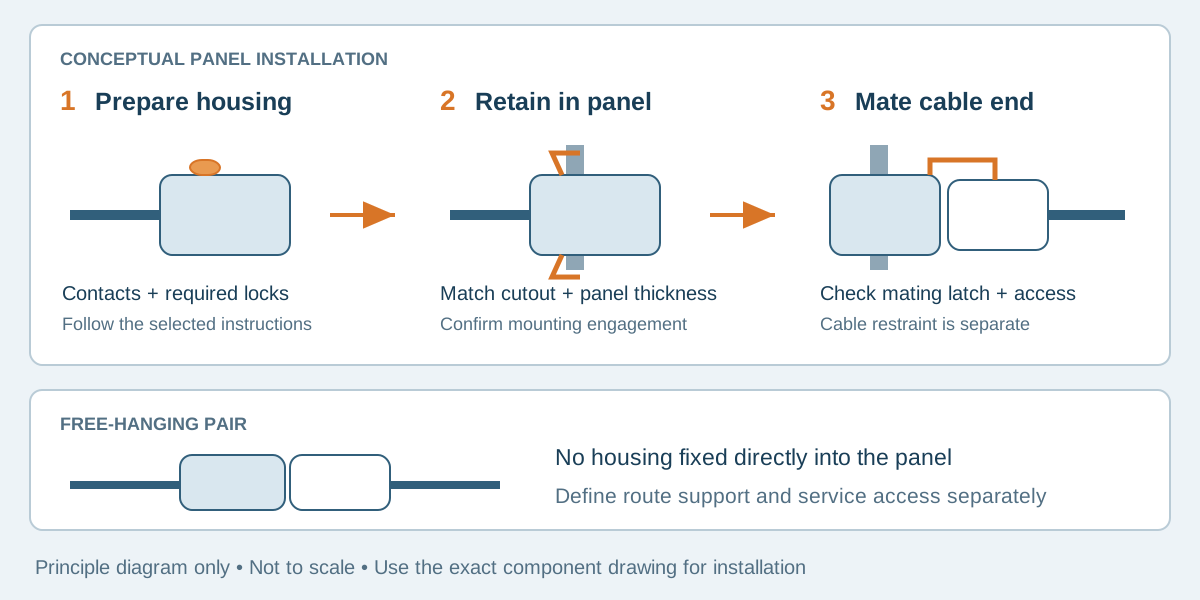
Conceptual illustration. Fictional examples are not approved product configurations, tooling instructions or inspection results.
Decide what the panel must hold
A fixed interface can give an operator a consistent mating position and keep a disconnect at an equipment boundary. It also creates responsibilities: the opening must match the chosen housing, the panel must support its retention features, and both assembly and later removal must remain possible.
A free-hanging pair can offer more freedom to position the connection within a harness. It still needs an installed routing and support plan. Leaving a connection unattached to a panel does not establish that it may swing against nearby parts or carry cable loads without restraint.
Scroll sideways to read all columns.
| Installation question | Panel-mounted interface | Free-hanging interface |
|---|---|---|
| Where is the disconnect located? | At a defined panel or bracket opening | Along a controlled cable route |
| What locates the housing? | Specified mounting features and supporting panel | Harness routing and any separately specified support |
| What must fit during assembly? | Housing, retention features and required insertion path | Connector pair and access along the cable route |
| What must remain accessible? | Mating latch and, if service requires it, panel-retention release | Mating latch and cable slack needed for separation |
| What still needs separate review? | Cable restraint, sealing and electrical suitability | Cable restraint, sealing and electrical suitability |
The Molex Mini-Fit Sigma product guide illustrates why the part number matters: its four-circuit dual-row table distinguishes free-hanging plug 172762-1004 from panel-mount plug 172767-3004. That comparison identifies mounting variants; it does not make the housings interchangeable in an enclosure drawing.
Use the exact housing drawing for the opening
Specify the housing part number and drawing revision before releasing the panel. Keep the connector drawing's view direction, polarization features, local dimensions and tolerances intact. A rectangular bounding box measured from a product photograph is not a panel cutout.
For a documented dimensional example, Molex drawing SD-172767-0000, revision E4 lists four-circuit housing 1727670004 on sheet 2. Its recommended panel cutout is viewed from the mating side. For this part, DIM D is 16.30 mm, with the cutout callout ±0.08 mm; the sheet specifies maximum panel thickness 1.60 mm. DIM D is one callout within a shaped opening, not a complete machining instruction. Use all features of the applicable drawing.
Sheet 1 requires terminals and TPAs to be assembled before panel insertion and states that the product must be used with the TPA installed. These requirements belong to the documented configuration. Obtain the current applicable drawing and application specification for a real order; do not substitute another Mini-Fit housing's dimensions or assembly sequence.
Check panel material, finished thickness, coating and edge condition with the equipment designer. Nominal sheet thickness alone may not describe the surface that the mounting feature actually engages. If a coating or enclosure revision changes that condition, reopen the fit review instead of assuming the opening is unchanged.
Review the assembly sequence before freezing the harness
A connector that fits the finished opening may still be impossible to install in the planned order. Determine which items must pass through the opening and when contacts, secondary locks, sleeves and other end features are fitted.
The introductory conceptual sequence separates housing preparation, panel retention and mating. It is not a product drawing or a universal assembly instruction. For the Molex example above, the preparation stage includes the required terminals and TPAs before panel insertion.
For each proposed build, walk through the operation with the real enclosure or a controlled representative fixture. Confirm the insertion side, wire exit direction, space to hold the housing, latch engagement and access for any specified tools. Include the mating half; a panel-mounted housing alone cannot demonstrate that the complete connection fits.
Identify who supplies and installs each item. An RFQ for a cable assembly may include the harness-side connector but exclude the enclosure, panel hardware or equipment-side mating part. Show excluded items as references so their mechanical requirements still remain visible.
Keep three retention questions separate
Panel retention holds the housing to the panel. The mating latch holds the connector pair together. Cable strain relief controls the load path into the cable and terminations. Passing one check does not answer the other two.
A service operation may need to release only the mating latch. Replacing a damaged fixed housing may also require access to its panel-retention features. Review those as different tasks, including the space needed behind the panel and the permitted extraction method.
Use the cable assembly strain relief guide for the cable-load question. Do not infer a sealing rating from a snap-in mount, and do not infer repeated-flex suitability from spare cable length. Define those requirements separately if the installation needs them.
Turn the installation into reviewable inputs
Scroll sideways to read all columns.
| RFQ or drawing input | What to provide |
|---|---|
| Fixed and removable sides | Identify the panel-held housing and the mating cable end |
| Component identity | Full housing, contact, lock and mating-part references |
| Panel interface | Controlled cutout drawing, view direction, material and finished thickness |
| Assembly order | Required preparation before insertion and any later operations |
| Service envelope | Access to mating latch, mounting release and cable handling space |
| Verification | Representative panel fit, full mating and the agreed removal operation |
Do not approve installation solely because electrical continuity passes. Record whether the assembly can be installed, retained, mated and serviced in the intended enclosure without forcing its route or damaging parts.
Frequently asked questions
Is panel mount the same as wire-to-board?
No. Panel mount describes mechanical location. Wire-to-board describes an electrical connection to a PCB. A wire-to-wire interface can have a housing retained in a panel.
Can a free-hanging housing use the panel-mount cutout?
Do not assume so. The retention geometry and part references must match the intended mounting arrangement. A custom bracket or holder is a separate design requiring review.
Does a mounted connector provide strain relief or sealing?
Not automatically. Housing retention, cable restraint and sealing are different requirements. Review the selected components and installed arrangement against each requirement.
Send the panel interface with the cable requirements
Explore wire-to-wire connector options, then contact Zeakka with the housing references, panel drawing, assembly sequence and service requirements. Zeakka coordinates sourcing as a trading partner. Proposed mounting configurations, original-brand components within finished assemblies and inspection arrangements require project-specific confirmation.
Share this article
Help others discover this content